---
title: "Area Guides: Area Market Reports"
description: Discover the latest update to Area Market Reports with a redesigned layout, improved calls to action, and smarter comps to better showcase local market trends.
---
[Skip to content](https://support.agentfire.com/en/area-guides-area-market-reports#main-content)
English
Show submenu for translations
[More support](https://support.agentfire.com/en/kb-tickets/new)

Open main navigation
Close main navigation
- English
Show submenu for translations
- [More support](https://support.agentfire.com/en/kb-tickets/new)
How can we help?
- There are no suggestions because the search field is empty.
1. [AgentFire Help Desk](https://support.agentfire.com/en)
2. [Site Tools](https://support.agentfire.com/en/site-tools)
3. [Area Guides](https://support.agentfire.com/en/site-tools#area-guides)
# Area Guides: Area Market Reports
We’ve rolled out a major update to Area Market Reports (AMRs), featuring a redesigned layout, stronger calls to action, and smarter comps—making them more engaging and effective than ever.
Area Market Reports, or AMRs for short, are meant to provide information to clients about trends in that particular market. These, by default, are linked in your area and neighborhood guide's market report forms:
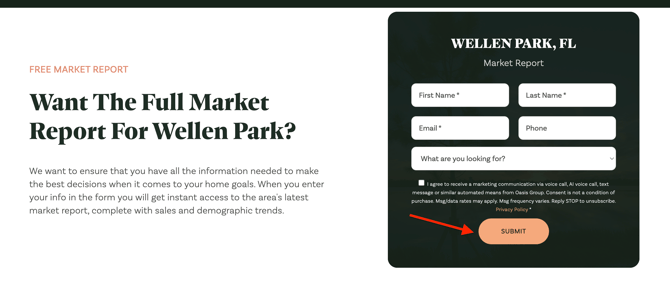
These reports are automatically created when you publish a new Area or Neighborhood Guide page. For more details on how to create a new area and/or neighborhood page, please refer to this [article](https://support.agentfire.com/en/area-guide-adding-and-editing-a-new-page). If you are based in Canada, you can find the relevant information [here](https://support.agentfire.com/en/how-to-create-area-guides-in-canada).
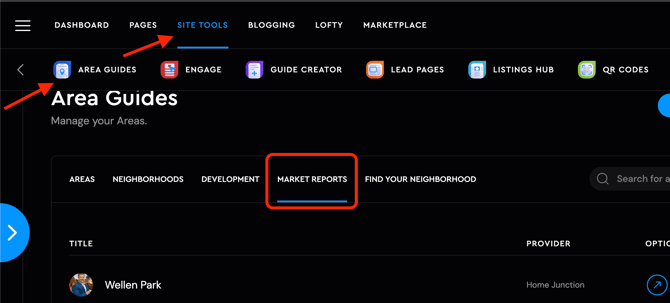
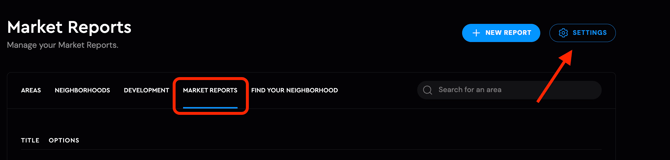
To access Market Reports, navigate to **Site Tools → Area Guides**, then click on **Market Report**, as shown below:
### Key Features with this new update:
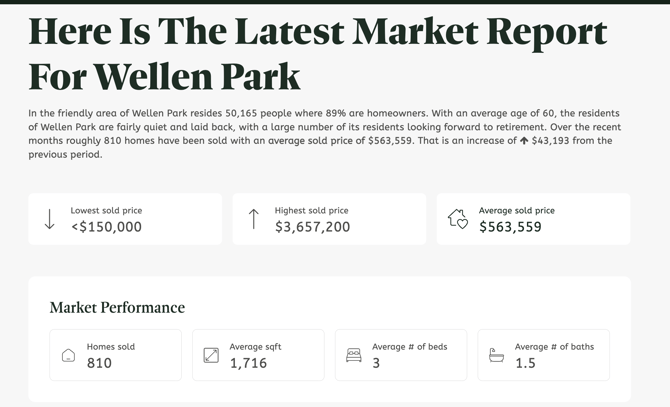
- **Modern, Organized Design:** Market report pages now present data in a cleaner, more structured layout that’s easier to read and more visually appealing.
- **Enhanced Call-to-Actions:** Calls to action are now more prominent, helping you guide visitors seamlessly from the report into your inbox and continue the conversation:
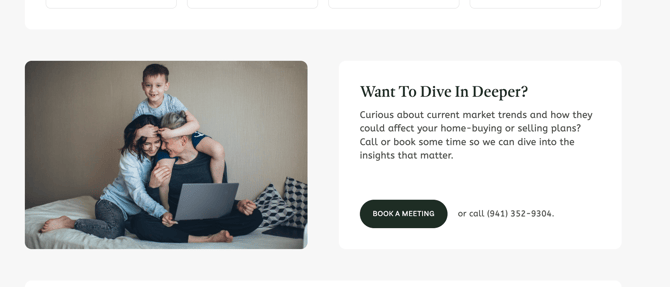
- **Full CTA Customization:** Control profile images, CTA text, and contact details directly from the Market Report settings in the Area Guides dashboard—or override defaults on individual reports with ease.
To make any desired changes, head over to the settings on the market report section, as shown below:
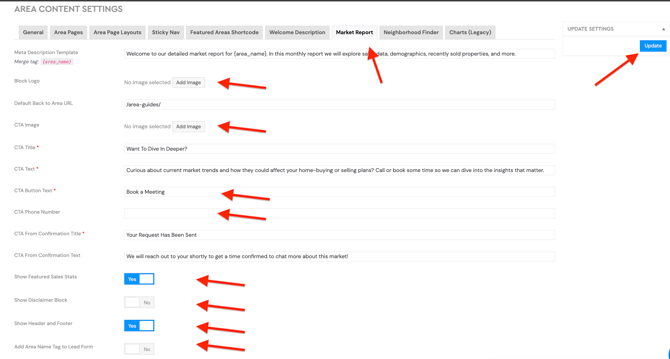
As shown above, you can customize the following settings as needed:
a. Meta description
b. Block logo
c. Default area URL
d. CTA block image
e. CTA title and text
f. CTA button text
g. CTA phone number
h. CTA form confirmation title and text
i. Toggle to show or hide featured sales statistics
j. Toggle to show or hide the disclaimer block
k. Toggle to show or hide the header and footer
l. Toggle to add the area name tag to the lead form
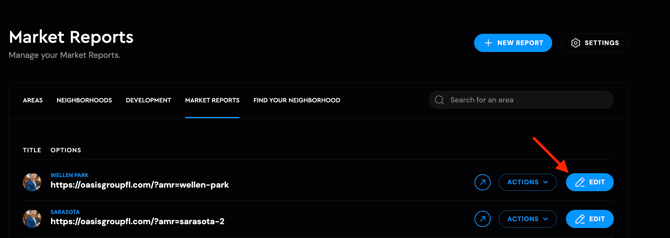
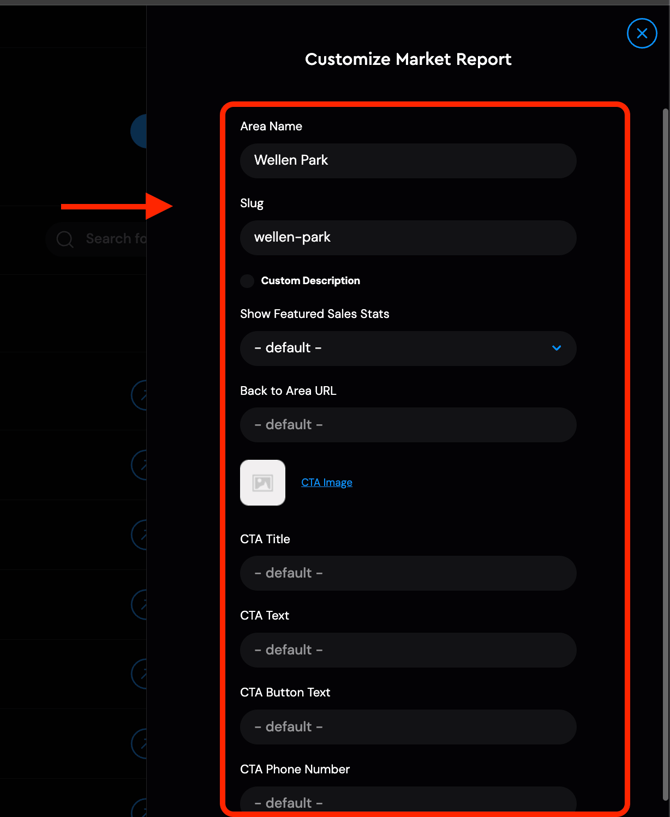
Alternatively, you can click the **Edit** button next to the Market Report to quickly make personalized edits for each area, as shown below:
- **Smarter, Dynamic Comps:** If you’re using AF IDX, AMRs now dynamically pull recently sold and active listings directly from the MLS.
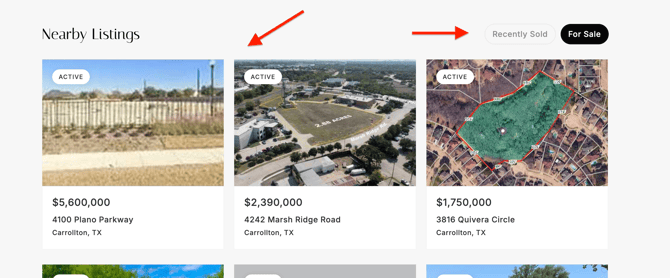
If no listing data is available, it will default to the following:
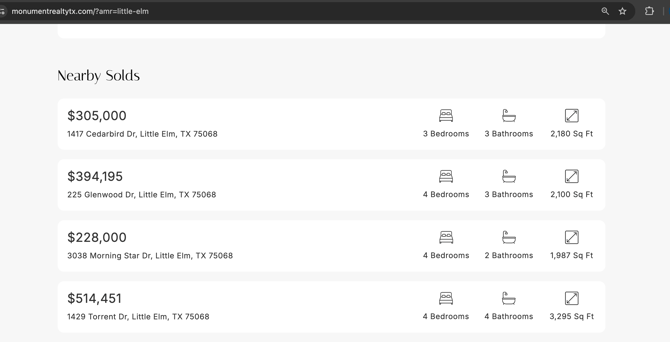
The update is now live, so you can jump in and start using it right away. If you have any questions, feel free to reach out to our support team at [support@agentfire.com](mailto:support@agentfire.com)
[mailto:?subject=I%20wanted%20you%20to%20see%20this%20site&body=Check%20out%20this%20site%20https%3A%2F%2Fupdates.agentfire.com%2Fa-fresh-more-powerful-experience-for-amrs%2F.](mailto:?subject=I%20wanted%20you%20to%20see%20this%20site&body=Check%20out%20this%20site%20https%3A%2F%2Fupdates.agentfire.com%2Fa-fresh-more-powerful-experience-for-amrs%2F.)
- [Site Tools](https://support.agentfire.com/en/site-tools#main-content)
- [Area Guides](https://support.agentfire.com/en/site-tools#area-guides)
- [Engage](https://support.agentfire.com/en/site-tools#engage)
- [Guide Creator](https://support.agentfire.com/en/site-tools#guide-creator)
- [Lead pages](https://support.agentfire.com/en/site-tools#lead-pages)
- [Reviews](https://support.agentfire.com/en/site-tools#reviews)
- [Team Members](https://support.agentfire.com/en/site-tools#team-members)
- [Listings Hub (Formerly My Listings)](https://support.agentfire.com/en/site-tools#listings-hub-formerly-my-listings)
- [Search pages](https://support.agentfire.com/en/site-tools#search-pages)
- [Spark AI](https://support.agentfire.com/en/site-tools#spark-ai)
- [QR Codes](https://support.agentfire.com/en/site-tools#qr-codes)
- [Spark Editor](https://support.agentfire.com/en/spark-editor#main-content)
- [Spark Editor](https://support.agentfire.com/en/spark-editor#spark-editor)
- [Lead Forms](https://support.agentfire.com/en/spark-editor#lead-forms)
- [Menus](https://support.agentfire.com/en/spark-editor#menus)
- [Spark Creator](https://support.agentfire.com/en/spark-editor#spark-creator)
- [Redirects and Domain Masking](https://support.agentfire.com/en/spark-editor#redirects-and-domain-masking)
- [Blogging](https://support.agentfire.com/en/spark-editor#blogging)
- [AgentFire IDX](https://support.agentfire.com/en/agentfire-idx#main-content)
- [Property Alerts and Saved Searches](https://support.agentfire.com/en/agentfire-idx#property-alerts-and-saved-searches)
- [Listing alerts](https://support.agentfire.com/en/agentfire-idx#listing-alerts)
- [IDX Questions](https://support.agentfire.com/en/agentfire-idx#idx-questions)
- [IDX Tools](https://support.agentfire.com/en/agentfire-idx#idx-tools)
- [Coaching and Success](https://support.agentfire.com/en/coaching-and-success#main-content)
- [Monthly Success Checklist](https://support.agentfire.com/en/coaching-and-success#monthly-success-checklist)
- [Tips & Tricks](https://support.agentfire.com/en/coaching-and-success#tips-tricks)
- [Dashboard Deep Dive Webinars](https://support.agentfire.com/en/coaching-and-success#dashboard-deep-dive-webinars)
- [Launch](https://support.agentfire.com/en/launch#main-content)
- [Email Routing](https://support.agentfire.com/en/launch#email-routing)
- [Redirects and DNS Management](https://support.agentfire.com/en/launch#redirects-and-dns-management)
- [Nameservers and Access](https://support.agentfire.com/en/launch#nameservers-and-access)
- [Google Services](https://support.agentfire.com/en/launch#google-services)
- [Add-Ons](https://support.agentfire.com/en/add-ons#main-content)
- [Team Link](https://support.agentfire.com/en/add-ons#team-link)
- [ADA Protect](https://support.agentfire.com/en/add-ons#ada-protect)
- [Home Values](https://support.agentfire.com/en/add-ons#home-values)
- [Neighborhood Quiz](https://support.agentfire.com/en/add-ons#neighborhood-quiz)
- [Local SEO Setup](https://support.agentfire.com/en/add-ons#local-seo-setup)
- [Integrations](https://support.agentfire.com/en/integrations#main-content)
- [Instafeed](https://support.agentfire.com/en/integrations#instafeed)
- [Zapier](https://support.agentfire.com/en/integrations#zapier)
- [Facebook](https://support.agentfire.com/en/integrations#facebook)
- [LionDesk](https://support.agentfire.com/en/integrations#liondesk)
- [IDX](https://support.agentfire.com/en/integrations#idx)
- [Lead Manager](https://support.agentfire.com/en/integrations#lead-manager)
- [Intercom Chat](https://support.agentfire.com/en/integrations#intercom-chat)
- [Ruuster](https://support.agentfire.com/en/integrations#ruuster)
- [Follow Up Boss](https://support.agentfire.com/en/integrations#follow-up-boss)
- [FAQs and General](https://support.agentfire.com/en/faqs-and-general#main-content)
- [Common Questions](https://support.agentfire.com/en/faqs-and-general#common-questions)
- [Google Analytics](https://support.agentfire.com/en/faqs-and-general#google-analytics)
- [IDX](https://support.agentfire.com/en/faqs-and-general#idx)
- [General](https://support.agentfire.com/en/faqs-and-general#general)
- [Posts Launch Training](https://support.agentfire.com/en/posts-launch-training)
- [Google Search Console](https://support.agentfire.com/en/google-search-console#main-content)
- [Google Search Console](https://support.agentfire.com/en/google-search-console#google-search-console)
- [Partner Program](https://support.agentfire.com/en/partner-program)
- [AgentFire Go](https://support.agentfire.com/en/agentfire-go)
[](https://support.agentfire.com/)
Copyright © 2026, Dark Galaxy Limited DBA AgentFire.com
```json
{
"@context" : "https://schema.org",
"@type" : "VideoObject",
"contentUrl" : "https://43634840.fs1.hubspotusercontent-na1.net/hubfs/43634840/New-AMR.mov",
"dateModified" : "2025-12-23T20:02:25.557Z",
"duration" : "PT13S",
"height" : 1100,
"name" : "New-AMR",
"thumbnailUrl" : "https://43634840.fs1.hubspotusercontent-na1.net/hubfs/43634840/New-AMR.mov/medium.jpg",
"uploadDate" : "2025-12-23T20:02:08.164Z",
"width" : 2042
}
```